

Complete Get A Listing Query
May 14, 2020
Now lets do what we did in the previous query and lets start in the Query.js file and add the following:
const params = {
  TableName: process.env.ListingsDB || "dev-listings",
  FilterExpression: "listingId = :listingId",
  ExpressionAttributeValues: {
    ":listingId": args.listingId,
  },
}
🍕In this params object we are using a FilterExpression to get the specific listing from the table, which is the listingId in our case.
🍕The ExpressionAttributesValues object is where we need to assign a value to the property we declared in the FilterExpression.
🍕 args is short for the arguments we take in from query, in this case we are taking in the listingId.
Next we can start sending these params to DynamoDB and return the selected listing:
try {
  const listing = await dynamodb.scan(params)

  if (listing.Items.length === 0) {
    return "There is no listing"
  } else {
    return {
      listingName: listing.Items[0].listingName,

      listingId: listing.Items[0].listingId,
      coverPhoto: listing.Items[0].coverPhoto,
      listingDescription: listing.Items[0].listingDescription,
      listingType: listing.Items[0].listingType.map(m => ({
        name: m,
      })),
      listingLocation: listing.Items[0].listingLocation,
      listingActivities: listing.Items[0].listingActivities.map(k => ({
        name: k,
      })),
      specialType: listing.Items[0].specialType,
      specialAmount: listing.Items[0].specialAmount,
      rating: listing.Items[0].rating,
      guide: {
        Name: listing.Items[0].guide.name,
        Bio: listing.Items[0].guide.bio,
        Avatar: listing.Items[0].guide.avatar,
      },
      price: listing.Items[0].price,
      numberOfDays: listing.Items[0].numberOfDays,
    }
  }
} catch (e) {
  return {
    message: e.message,
    code: "500",
  }
}
🍕In our try-catch we do a scan again to to retrieve the listing
🍕 Then we check if the scan returned a listing that exists. If so we return the data associated to that listing.
🍕 Since it was a filter scan it will still be an array and we can always assume it will be the first element.
🍕Lastly we return a message and code if there is an error.
Next up we can run this query in Playground:
{
  getAListing(listingId:"a114dded-ddef-4052-a106-bb18b94e6b51"){
    listingId
    listingName
    listingType{
      name
    }
    listingActivities{
      name
    }
  }
}
The query above should get you the same output as shown in the screenshot:
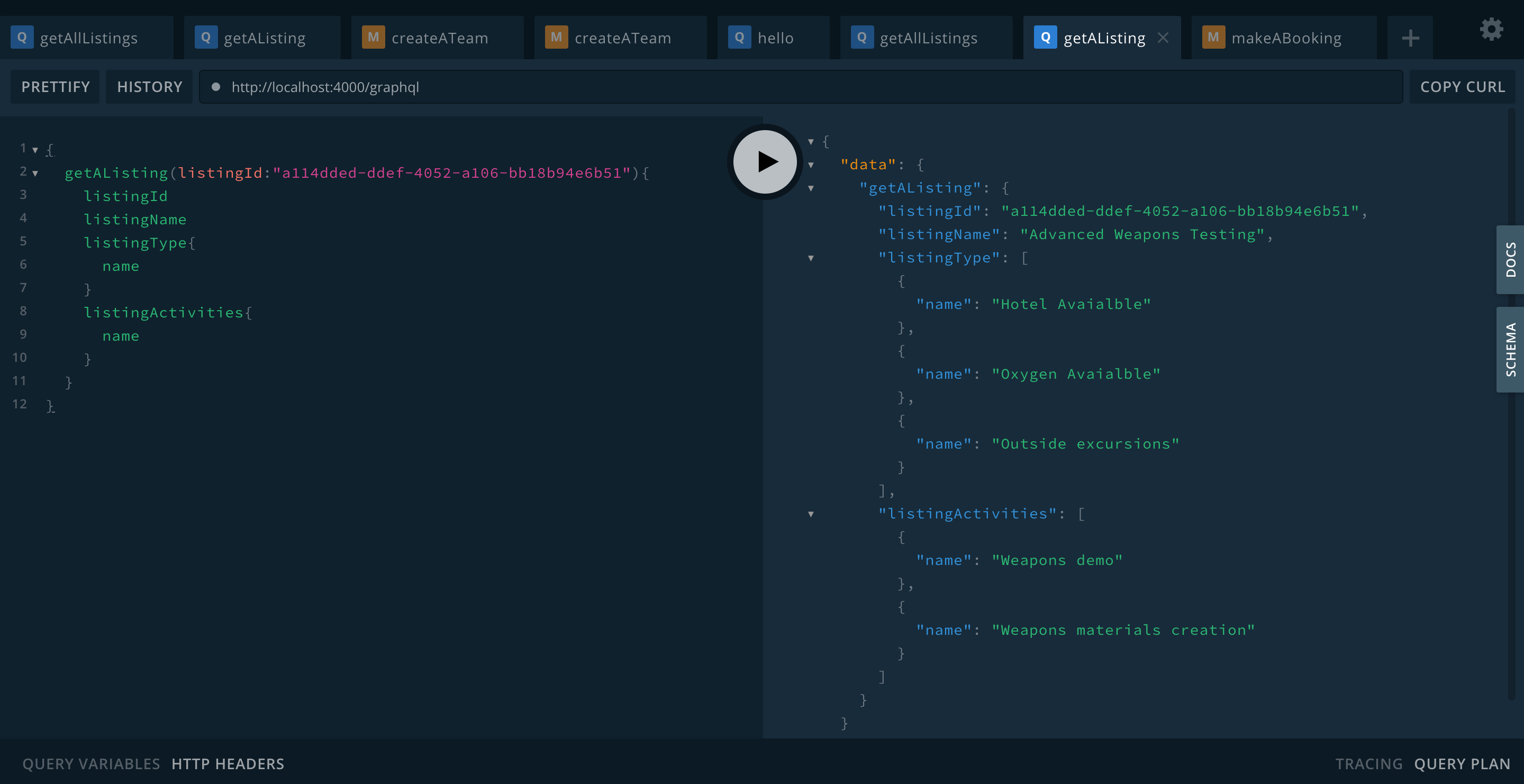
Now that we have the query working we can start on the mutation.
 Previous
